Polarr
Screenshots
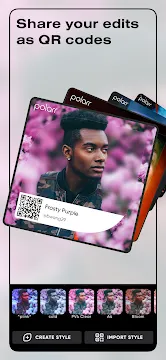
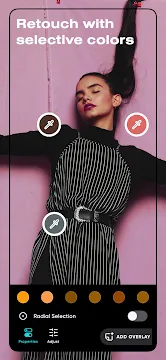
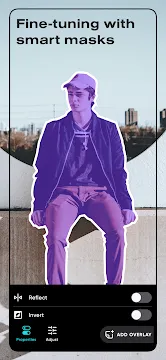
Polarr: Photo Filters & Editor provides mobile users with professional tools to alter their pictures. Many mobile creators look for ways to enhance their images without using heavy desktop software. This mobile tool solves that problem completely. It offers sophisticated color adjustments and smart overlays. You can change specific parts of your image with high precision. Millions of people download this platform to transform standard mobile photos into artistic masterpieces. Then, they share their work directly to social networks. Let us look deeper into what makes this software unique.
Polarr: Photo Filters & Editor Offers Infinite Visual Creativity
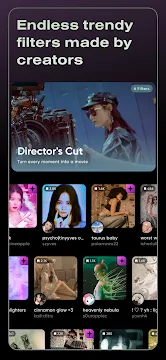
The standard mobile gallery filter often feels boring and basic. However, Polarr: Photo Filters & Editor expands your creative options with millions of custom styles. These aesthetic styles come from creators located all over the globe. You can search the vast library to find modern looks that match your current mood.
Every single week, the platform updates its featured collections. This frequent rotation keeps your photography looking fresh and trendy. Then, you can save your favorite aesthetics to your custom profile. You will never run out of visual themes for your social feed.
- Search millions of trendy mobile aesthetics
- Save your favorite color styles instantly
- Explore curated creator highlights every week
- Discover new visual trends in real time
Polarr: Photo Filters & Editor Uses Intelligent Object Selection
Selective editing used to require advanced masking skills on desktop computers. Now, Polarr: Photo Filters & Editor automates this difficult process using smart scanning tools. The system recognizes the specific structures inside your picture instantly.
For example, you can tap a button to select only the background. Then, you can darken the background to make your main subject pop. The software isolates individual elements with high accuracy.
- Sky Masks: Alter the sky brightness or add beautiful gradient colors.
- Person Isolation: Smooth the skin or change lighting on people specifically.
- Background Tuning: Apply radial blur or desaturate the area behind subjects.
- Object Selection: Target buildings, animals, or vegetation without bleeding into other areas.
Polarr: Photo Filters & Editor Empowers Custom Style Creation
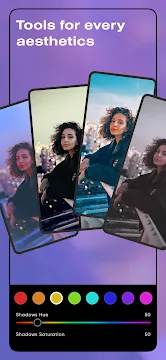
You do not have to rely only on the work of other people. Instead, The App allows you to build your own distinct look from scratch. You can combine global adjustments like curves and grain with custom textures.
Once you finish your masterpiece, you can save the settings as a custom style. This function helps you maintain a consistent look across all your mobile pictures.
- Import your raw photo into the main editing workspace.
- Adjust the global lighting, contrast, and color curves.
- Stack custom overlays like dust textures or light leaks.
- Export your combination as a brand new reusable look.
Polarr: Photo Filters & Editor Uses QR Codes for Quick Sharing
Sharing your specific photo adjustments with your friends used to be a long process. Luckily, Polarr: Photo Filters & Editor changes that by using a smart generation system. The tool converts your complex editing formulas into unique QR codes.
Your friends can simply scan this graphical code using their phone camera. Then, the custom style applies to their image instantly. This function turns photo styling into a social experience.
Pro Tip: You can find thousands of these custom style QR codes on social platforms like Pinterest and Instagram. Scanning them takes only one second.
Advanced Retouching Tools Features
Portrait photography requires precise adjustments to look truly stunning. The App includes a powerful face detection system. The tool maps individual facial features automatically.
Then, you can make detailed adjustments to specific facial shapes. You can alter the nose width or adjust the chin shape with smooth sliders. The tool preserves natural textures while correcting minor blemishes.
- Skin Correction: Smooth out uneven tones while keeping natural skin grain.
- Feature Reshaping: Fine-tune the eyes, nose, and mouth shapes carefully.
- Teeth Whitening: Brighten smiles naturally without creating a fake glow.
- Liquify Panel: Wrap and distort specific image areas for artistic proportions.
Polarr: Photo Filters & Editor Simplifies High Volume Workflows
Editing a large number of photos from a single event can take hours. Therefore, Polarr: Photo Filters & Editor provides helpful productivity tools. You can apply your favorite aesthetic look to multiple images simultaneously.
The batch export system processes your images quickly in the background. Then, it saves them in high resolution directly to your local storage folder. This feature saves an immense amount of time for mobile content creators.
Conclusion
Polarr: Photo Filters & Editor bridges the gap between casual phone adjustments and heavy desktop software. It replaces basic sliders with intelligent segmentation masks and creator networks. You can download existing visual aesthetics or engineer your own signature style. The unique QR code sharing system makes creative collaboration incredibly fun and immediate. It does require a relatively modern mobile device to process the heavy AI layers smoothly. However, the sheer depth of the coloring tools makes it a mandatory utility for mobile artists.